
- SureCookie Installation Guide
- Installing SureCookie Pro
- Updating SureCookie
- How to Set Up SureCookie: Onboarding Wizard Guide
- SureCookie Dashboard Overview
- Connecting Your Site to SureCookie (Scanner Setup)
- Using SureCookie on Multiple Sites
- Uninstalling SureCookie & Data Cleanup
- Preferences Settings (Menu, Branding, Analytics)
- Re-Consent
- Understanding SureCookie Logs
- How to Set Up Geographic Targeting
- Resource Blocking
- Setting Up Google Consent Mode v2
- Consent Models Explained (Opt-in vs Opt-out)
- Exporting Consent Logs (PDF Proof + CSV)
- Consent & Data Settings (Duration, Retention, Renew)
- Consent Forwarding Across a Multisite Network
- Resource / Script Blocking (Add Embeds + Fixes)
- Is SureCookie GDPR Compliant? (Overview)
- CCPA / CPRA Compliance with SureCookie
Exporting Consent Logs (PDF Proof + CSV)
SureCookie records every consent choice in your WordPress database, giving you an audit trail you can produce on demand. There are two ways to get that record out: a PDF proof of a single consent, for an audit or a dispute, and a CSV export of your logs, for record-keeping and analysis.
Before you start, consent logging must be on. Turn it on under SureCookie → Settings → General → Consent & Data with Enable Consent Logging. You’ll find your records at SureCookie → Logs.
What a Consent Log Records
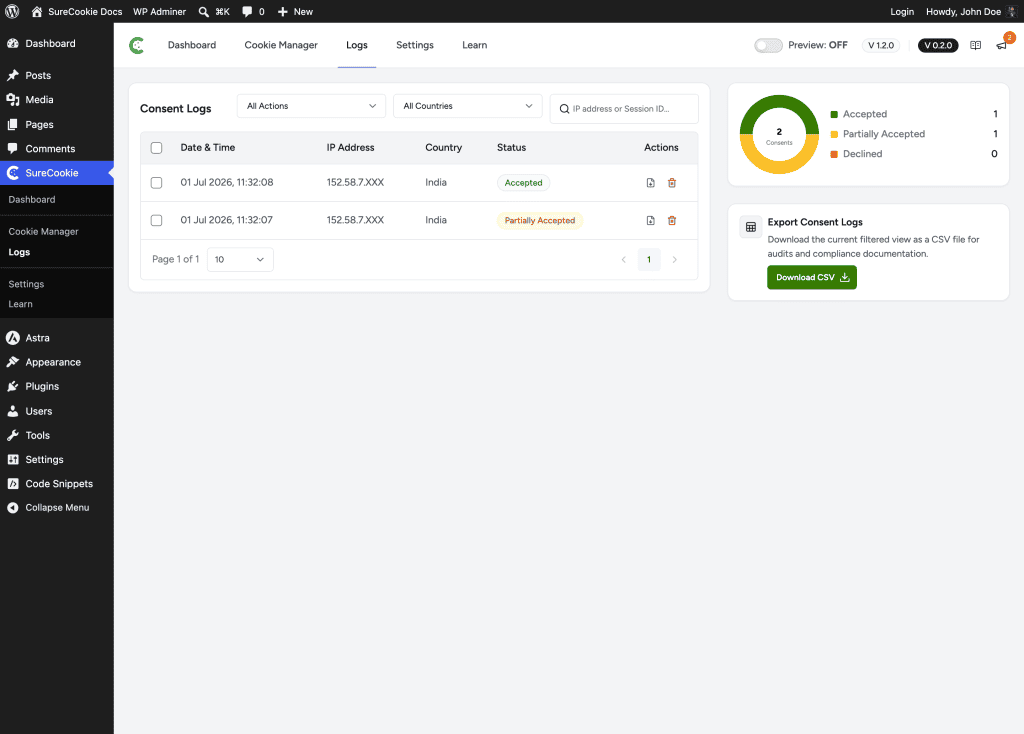
Each entry captures the visitor’s Date & Time, a masked IP Address, Country, and the consent Status (Accepted, Partially Accepted, or Declined), along with the per-category choices and session ID.
Important: IP addresses are masked and are personal data under GDPR. Handle exported logs, and who you share them with, accordingly.
Download a PDF Proof (One Record)
For an audit, a dispute, or GDPR Article 7 accountability, download a formal proof-of-consent document for a single record. This is available on all plans.
- Go to SureCookie → Logs.
- Find the record you need, using the filters or search.
- In that record’s Actions column, click the download (PDF) icon.
SureCookie generates a Proof of Consent PDF that includes the record’s ID, timestamp, IP address, session ID, country, consent status, and per-category choices, along with the date it was generated. It saves as consent-proof-<id>.pdf.
Export Logs as CSV
Exporting your logs to CSV is a SureCookie Pro feature, suited to legal audits and GDPR Article 7 documentation.
- Go to SureCookie → Logs.
- Filter the list to the records you want. The CSV reflects your current filtered view.
- In the Export Consent Logs panel, click Download CSV.
On the free plugin, this panel shows an upgrade prompt in place of the download button.
Filter Before You Export
Both exports respect what you’re viewing, so narrow the list first:
- All Actions – Filter by status: Accepted, Partially Accepted, or Declined.
- All Countries – Filter by the visitor’s country.
- Search – Find a record by IP address or Session ID.
The chart beside the table summarizes your Accepted, Partially Accepted, and Declined counts at a glance.
Keep Your Logs Available
Consent logs live in your WordPress database, and their retention is configurable under SureCookie → Settings → General → Consent & Data. If you need proof for the long term, export the records you care about before older logs are pruned.
Troubleshooting
- The list is empty, or shows “Consent log is empty” – Consent logging may be off, or no visitor has responded yet. Turn on Enable Consent Logging under SureCookie → Settings → General → Consent & Data.
- The PDF didn’t download – Check your browser’s download settings and popup blocker. The file saves as
consent-proof-<id>.pdf. - Download CSV isn’t available – CSV export is a SureCookie Pro feature. The free plugin shows an upgrade prompt in its place.
Next Steps
To control how long records are kept or turn logging on or off, see Consent & Data settings. To understand what visitors are consenting to, see Consent Models Explained (Opt-in vs Opt-out).
We don't respond to the article feedback, we use it to improve our support content.