
- SureCookie Installation Guide
- Installing SureCookie Pro
- Updating SureCookie
- How to Set Up SureCookie: Onboarding Wizard Guide
- SureCookie Dashboard Overview
- Connecting Your Site to SureCookie (Scanner Setup)
- Using SureCookie on Multiple Sites
- Uninstalling SureCookie & Data Cleanup
- Preferences Settings (Menu, Branding, Analytics)
- Re-Consent
- Understanding SureCookie Logs
- How to Set Up Geographic Targeting
- Resource Blocking
- Setting Up Google Consent Mode v2
- Consent Models Explained (Opt-in vs Opt-out)
- Exporting Consent Logs (PDF Proof + CSV)
- Consent & Data Settings (Duration, Retention, Renew)
- Consent Forwarding Across a Multisite Network
- Resource / Script Blocking (Add Embeds + Fixes)
Preferences Settings (Menu, Branding, Analytics)
The Preferences screen holds SureCookie’s admin-side conveniences: where the plugin’s menu lives in your WordPress dashboard, whether the banner carries “Powered by SureCookie” branding, and whether you share anonymous usage data to help improve the plugin. None of these affect how consent works for your visitors.
Find it at SureCookie → Settings → General → Preferences.
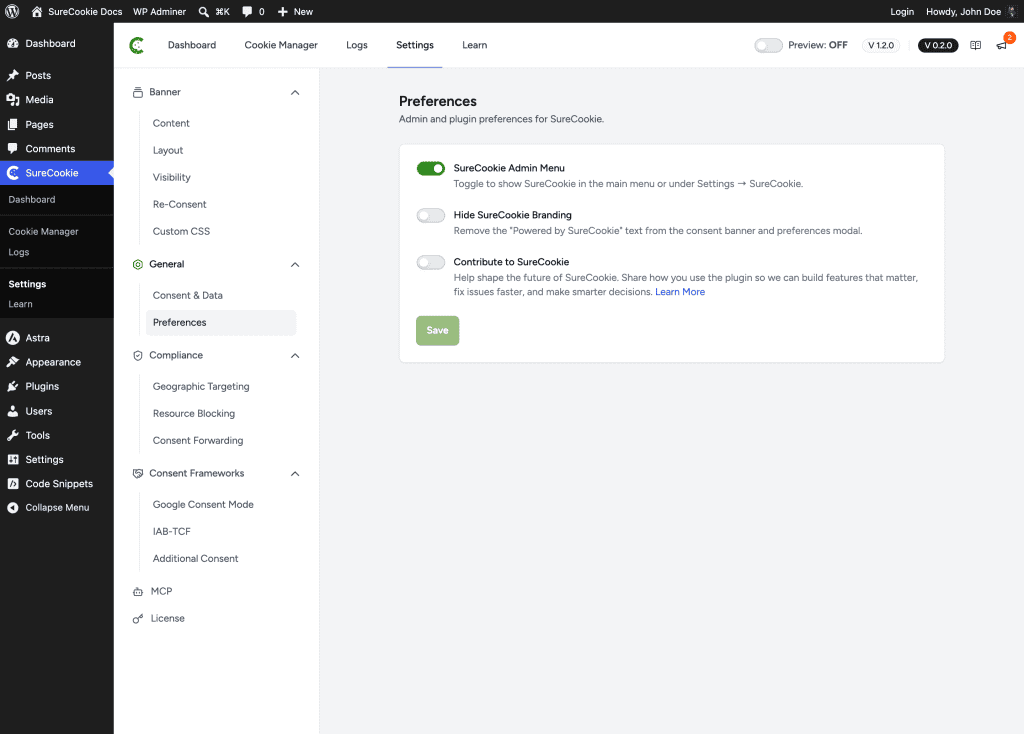
SureCookie Admin Menu
This toggle controls where SureCookie appears in your WordPress admin.
- On (the default) – SureCookie shows as its own item in the main admin menu, one click away.
- Off – SureCookie moves under Settings → SureCookie, keeping your main menu shorter.
This is purely about menu placement. Every screen and feature works the same either way.
Hide SureCookie Branding
By default, the consent banner and preferences modal show a small “Powered by SureCookie” line. Turning on Hide SureCookie Branding removes it from both, leaving a fully white-labeled banner.
On the free plugin, the toggle is shown but disabled, with an upgrade link.
Contribute to SureCookie (Usage Analytics)
Contribute to SureCookie shares non-sensitive information about how you use the plugin, so the team can build features that matter, fix issues faster, and make smarter decisions.
- It’s off by default. Nothing is shared unless you turn it on.
- It concerns plugin usage data, not your visitors’ consent choices, which stay in your database either way.
- For exactly what’s collected, follow the Learn More link on the screen, or see Share Usage Data.
Save Your Changes
Adjust the toggles you need, then click Save.
Troubleshooting
- SureCookie disappeared from the admin menu – The Admin Menu toggle is off. Find it under Settings → SureCookie, and turn the toggle back on from this screen if you prefer the top-level menu.
- The branding toggle won’t switch – Hiding branding is a SureCookie Pro feature; the toggle is disabled on the free plugin.
- Branding still shows after enabling the toggle – Save your settings, then clear your page and CDN caches so the updated banner is served.
Next Steps
For consent validity and log retention, see Consent & Data Settings (Duration, Retention, Renew). To style the banner itself, see Customizing Banner Colors (Custom Colors, WCAG).
We don't respond to the article feedback, we use it to improve our support content.