
- SureCookie Installation Guide
- Installing SureCookie Pro
- Updating SureCookie
- How to Set Up SureCookie: Onboarding Wizard Guide
- SureCookie Dashboard Overview
- Connecting Your Site to SureCookie (Scanner Setup)
- Using SureCookie on Multiple Sites
- Uninstalling SureCookie & Data Cleanup
- Preferences Settings (Menu, Branding, Analytics)
- Re-Consent
- Understanding SureCookie Logs
- How to Set Up Geographic Targeting
- Resource Blocking
- Setting Up Google Consent Mode v2
- Consent Models Explained (Opt-in vs Opt-out)
- Exporting Consent Logs (PDF Proof + CSV)
- Consent & Data Settings (Duration, Retention, Renew)
- Consent Forwarding Across a Multisite Network
- Resource / Script Blocking (Add Embeds + Fixes)
Scan Limits & Quotas Explained (5-Page Free Limit)
The cookie scanner comes with two limits: how many pages one scan can visit, and how many scans you can run per day. On the free plan that’s 5 pages per scan and 5 scans per day, and paid plans raise both. This article explains why the limits exist, exactly what each plan includes, and how to get complete cookie coverage within them.
One thing first: the limits apply only to scanning. Your consent banner, script blocking, and consent logging are never limited, and they keep working at full strength whether or not you ever scan again.
Why Is There a Page Limit?
Two honest reasons.
A few pages is usually all detection needs. Cookies aren’t set page by page; they’re set by the theme, plugins, analytics, and marketing tags that load across your whole site. The tracker that appears on your homepage is almost always the same one on your other 500 pages. That’s why scanning a handful of representative pages typically finds the same cookies a full-site crawl would. More pages mostly re-detect what the first few already found.
Real-browser scanning is heavyweight by design. SureCookie doesn’t guess cookies from your HTML. Every scan starts a real browser session on our scanning infrastructure that visits each page the way an actual visitor would, waiting for scripts, embeds, and tag managers to run. That is what makes the results accurate, and it takes genuine computing time for every page visited. The limits keep the scanner fast and reliable for every site that shares it, and they’re what makes it possible to offer real-browser scanning on a free plan at all.
The Limits at a Glance
| Plan | Pages per day (per site) | Max pages per single scan | Scans per day | Sites |
|---|---|---|---|---|
| Free | – | 5 | 5 | 1 |
| Solo | 100 | 100 | Unlimited | 1 |
| Team | 200 | 200 | Unlimited | 10 |
| Agency | 500 | 200 | Unlimited | 1,000 |
Two details that clear up most plan confusion:
- Pages per scan and scans per day are separate limits. One is how big a single scan can be; the other is how many times you can scan today.
- Your allowance is shared across connected sites. On plans covering multiple sites, all sites connected to the same license draw from one daily budget. See Using SureCookie on Multiple Sites.
Getting Full Coverage on 5 Pages
The free limit works well when you spend it on variety rather than volume.
- Go to SureCookie → Cookie Manager → Manual.
- Under Select Pages, pick pages that differ from each other: your homepage, a blog post, and any page with something special on it, an embedded video or map, a contact form, or a checkout.
- Click Start Scan.
Five distinct page types catch what five similar pages can’t. And detection isn’t your only net: known tracking services are blocked by Resource Blocking site-wide regardless of which pages you scanned, and any cookie the scan didn’t reach can be added by hand. See Why Some Cookies Aren’t Detected.
Tracking Your Usage
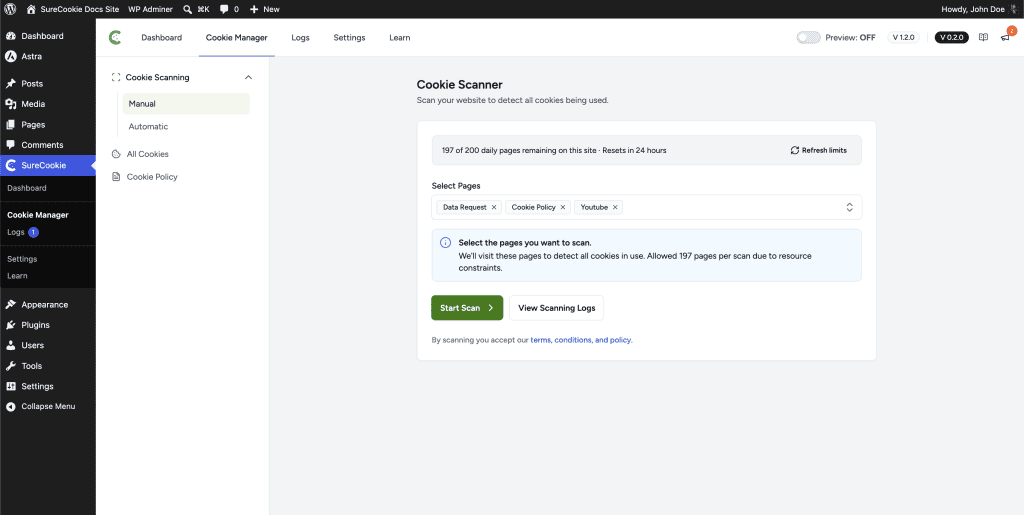
The scanner shows your live allowance at the top of the page: how many daily scans you have left, your remaining page budget, and when it resets.
Limits reset automatically every day. If the numbers look out of date, click Refresh limits.
What Happens When You Hit a Limit
Nothing breaks, and nothing is lost.
- Your page budget runs out mid-scan – The scan finishes the pages that fit and tells you the rest will be scanned after the budget resets. They’re picked up automatically.
- You’ve used the day’s scans – The scanner shows Daily Limit Reached, and your allowance refreshes the next day.
- Too many retries in a short burst – You may see an HTTP 429 message. Wait 15 to 30 minutes and it clears on its own. See Fix a Stuck or Failed Cookie Scan.
Remember: a paused or exhausted scan never affects your banner or blocking. It only delays cookie discovery.
If Your Site Needs More
Larger sites and agencies genuinely do need more pages, and that’s what the paid plans in the table above are sized for. If you’re scanning bigger sites or many of them, the Upgrade to Pro and Scan Booster options on the scanner page raise your allowance.
Next Steps
To keep your cookie list current without spending on manual scans, see Automatic (Scheduled) Scanning.
We don't respond to the article feedback, we use it to improve our support content.