
- SureCookie Installation Guide
- Installing SureCookie Pro
- Updating SureCookie
- How to Set Up SureCookie: Onboarding Wizard Guide
- SureCookie Dashboard Overview
- Connecting Your Site to SureCookie (Scanner Setup)
- Using SureCookie on Multiple Sites
- Uninstalling SureCookie & Data Cleanup
- Preferences Settings (Menu, Branding, Analytics)
- Re-Consent
- Understanding SureCookie Logs
- How to Set Up Geographic Targeting
- Resource Blocking
- Setting Up Google Consent Mode v2
- Consent Models Explained (Opt-in vs Opt-out)
- Exporting Consent Logs (PDF Proof + CSV)
- Consent & Data Settings (Duration, Retention, Renew)
- Consent Forwarding Across a Multisite Network
- Resource / Script Blocking (Add Embeds + Fixes)
- Is SureCookie GDPR Compliant? (Overview)
- CCPA / CPRA Compliance with SureCookie
CCPA / CPRA Compliance with SureCookie
SureCookie gives you the tools to meet California’s CCPA and CPRA cookie requirements using an opt-out model, but no plugin makes a website compliant on its own. Compliance also depends on how you configure it and the legal advice you follow.
This overview explains how SureCookie supports CCPA/CPRA and what stays your responsibility.
CCPA / CPRA in Brief
Unlike the GDPR’s opt-in approach, California’s CCPA and its update, the CPRA, use an opt-out model. You may run non-essential cookies by default, but you must give visitors a clear way to opt out (the right to say “Do Not Sell or Share My Personal Information”) and honor opt-out preference signals like Global Privacy Control (GPC).
How SureCookie Helps
- Opt-out consent model – Non-essential cookies run by default, and the banner gives visitors a clear way to opt out. See Consent Models Explained (Opt-in vs Opt-out).
- A “Do Not Sell My Personal Information” control – With the California (CCPA) setup, the banner’s opt-out button reads Do Not Sell My Personal Information, the recognizable CCPA opt-out action.
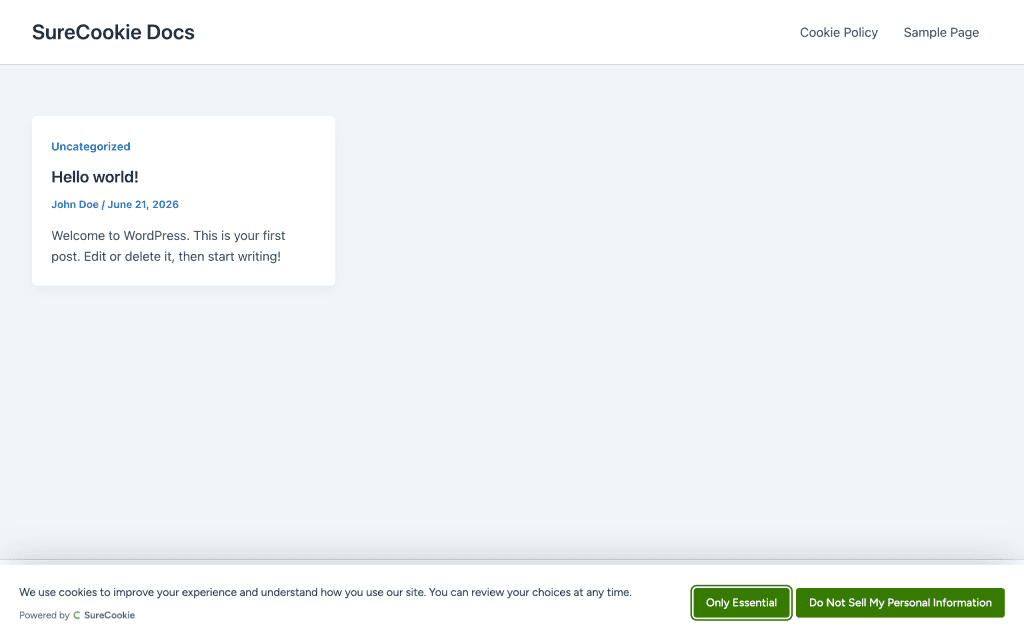
- Global Privacy Control (GPC) – SureCookie detects the browser’s GPC signal and automatically opts the visitor out of non-essential cookies, with no action needed from them. This helps meet CPRA’s requirement to honor opt-out preference signals.
- Apply it by region – With SureCookie Pro, Geographic Targeting’s California, USA (CCPA/CPRA) preset applies the opt-out model to US visitors while EU visitors get opt-in (GDPR), automatically by location. See Using SureCookie on Multiple Sites.
- Records and proof – Every choice, including opt-outs, is recorded. Export a PDF proof or a CSV of your logs. See Exporting Consent Logs (PDF Proof + CSV).
- Know your cookies – The scanner detects and categorizes the cookies in use, so your disclosures stay accurate.
Setting It Up
- Decide your scope. If your audience is mainly Californian or US-based, use the opt-out model. To serve multiple regions, use Geographic Targeting (Pro) so California gets the CCPA preset and the EU gets opt-in.
- Confirm the banner shows an opt-out control such as Do Not Sell My Personal Information.
- Leave GPC support to work automatically; SureCookie honors the signal for visitors who send it.
What You Still Need to Do
SureCookie provides the mechanism; you complete the rest:
- Publish the required notices – Provide your CCPA/CPRA disclosures and a Do Not Sell or Share My Personal Information link or page where required.
- Configure the model for your audience – Apply opt-out where it fits, using Geographic Targeting for multi-region sites.
- Confirm your obligations – Whether and how CCPA/CPRA applies to you depends on your business. Determine it with professional advice.
Important: SureCookie provides the technical infrastructure for consent management. It is not legal advice, and using it does not by itself guarantee compliance. Your obligations depend on your business and jurisdiction, so always consult a qualified legal professional.
Related
To understand the opt-in versus opt-out difference, see Consent Models Explained (Opt-in vs Opt-out). For the EU counterpart, see Is SureCookie GDPR Compliant? (Overview).
We don't respond to the article feedback, we use it to improve our support content.